Supervisor and VKS clusters are built using a common Kubernetes distribution core, but their Kubernetes versions are delivered differently. Starting with VCF 9, Supervisor Kubernetes releases are delivered independently of vCenter. You can update the Supervisor version by deploying a release from the Supervisor Content Library. In this blog post, we will walk through the Supervisor update process step by step. Let’s get started!
Create and Configure a Subscribed Content Library for Supervisor Images
For vSphere Supervisor, VMware publishes Supervisor images through a content delivery network (CDN). To enable or upgrade vSphere Supervisor, you can create a Subscribed Content Library that synchronizes with the Supervisor release images.
You can configure the content library in either Immediate or On-Demand synchronization mode. Note that immediate synchronization from the public CDN may require more time and consume additional disk space.
Log in to vCenter as a vSphere administrator.
From the Home menu, select Content Libraries
Click Create
Provide a name for the library (for example, supervisor update library) and click Next.
On the Configure Content Library page, select Subscribed Content Library.
In the Download content section, select the synchronization mode of the content library and click Next
When prompted, accept the SSL certificate thumbprint.The thumbprint will remain stored on your system until the subscribed content library is removed from the inventory
Apply Security Policy click Next
On the Add storage page, select a datastore as a storage location for the content library contents and click Next.
Review the details and click Finish
Assign the content library to the vSphere Supervisor platform
on vCenter go to Home menu, select Supervisor Management
Select Content Distribution.
On the Supervisor Images Library card, click Assign
Select the Content Library that created above and click Assign
The new content library begins synchronizing, which may take some time. After synchronization is complete, the new Supervisor Kubernetes versions included in the images will appear under the Updates tab
Apply Updates
Select the Available Version you want to update to. For example: v1.30.10+vmware.1-fips-vsc9.0.0.0100. ⚠️ Updates must be applied incrementally. You cannot skip versions (e.g., upgrading directly from 1.28 to 1.30). The correct sequence is 1.28 → 1.29 → 1.30.
Select a Supervisor to update and click Apply Updates
The system runs a series of pre-checks to verify the compatibility of the different components against the Supervisor Kubernetes version to which you want to update.
Learn which are the pre-checks that are run before updating the supervisor and how to troubleshoot in case of errors resulting from failed pre-checks, HERE
When the pre-checks are completed successfully, you can update the Supervisor.
Upgrading the VMware vSphere Supervisor service is a critical step in maintaining a secure, stable, and feature-rich VMware Cloud Foundation environment. By following best practices—planning incremental updates, leveraging subscribed content libraries, and validating compatibility at every stage—administrators can ensure minimal downtime while keeping workloads and Kubernetes clusters up to date. Regular Supervisor upgrades not only enhance platform capabilities but also strengthen the foundation for running modern applications, containers, and cloud-native services efficiently and reliably.
In today’s multi-tenant cloud environments, VMware Cloud Foundation Automation(VCFA) offers a robust layered architecture that seamlessly bridges enterprise-grade infrastructure management with developer-ready self-service capabilities.
By clearly separating responsibilities—from VMware Cloud Service Providers who manage the physical and virtual infrastructure, to organization administrators who allocate resources, and finally to developers who consume them—VCFA enables efficient resource governance, operational consistency, and scalability. This structured approach not only supports multi-tenancy and workload isolation but also accelerates innovation by empowering end users to deploy applications and services quickly within well-defined boundaries.
Why Tenant Management Matters?
Tenant management is more than just dividing resources—it’s about ensuring cost efficiency, security, scalability, and compliance in a shared infrastructure. In VCFA, these capabilities allow VMware Cloud Service Providers to maximize utilization without compromising performance or governance for individual tenants.
Key concepts to understand from both the Provider and Tenant perspectives:
Projects
Projects control user access to namespaces and user ownership of provisioned resources. All organizations are created with a default project. The default project is empty and does not have any namespaces or users.
Example: A VMware Cloud Service Provider might assign a dedicated project to each customer department for clearer billing and isolation.
Regions
The Regions page lists all the regions where the organization has a quota in. Organizations can have a quota in one or many regions. Your provider administrator assigns the regional quota to your organization. Quota in a region can come from one or many vSphere Zones within that region.
Example: A global enterprise hosted by a VMware Cloud Service Provider might have quotas in Asia and Europe to ensure low-latency access for local teams.
Namespace Class
Namespace classes are templates for namespace provisioning. These templates can be used to standardize namespace attributes, like utilization limits, reservations, VM classes, storage classes, and content libraries. organizations comes preconfigured with three default namespace classes (small, medium, and large), which are meant to serve as example templates. The only different attributes among these built-in templates are the CPU and Memory limits. Administrators can use these templates as-is or can modify them to suit their needs.
Namespace
Projects are the central construct for organizing and allocating infrastructure resources to tenants or teams. As the organization administrator, you manage and distribute infrastructure by assigning namespaces to projects. When configuring a project, you must add at least one namespace so that users within the project can begin provisioning workloads such as virtual machines, VMware Kubernetes Service (VKS) clusters, or other supported resources. Namespaces act as scoped resource pools, defining limits for CPU, memory, and storage to ensure fair allocation and performance consistency. Each namespace is tied to a Virtual Private Cloud (VPC) and a namespace class, which in turn is associated with at least one zone to determine placement and availability. This structure not only enforces resource governance but also enables automation workflows to deploy consistently within predefined boundaries. All organizations are created with a default project, which is initially empty and contains no namespaces or users, providing a baseline starting point for configuration.
Example: A tenant of a VMware Cloud Service Provider might create separate namespaces for development and production to avoid accidental resource conflicts.
Virtual Private Clouds (VPCs)
A Virtual Private Cloud (VPC) in VMware Cloud Foundation Automation (VCFA) offers an isolated networking environment that can be associated with one or more namespaces. Organizations can create multiple VPCs and assign each to specific namespaces based on workload or isolation requirements.
Each VPC is an independent network and supports three types of IP address spaces, each offering different levels of reachability:
Private CIDRs: These addresses are internal to the VPC and are not routable outside without NAT. They are managed by the VPC administrator and do not need to be globally unique, allowing reuse across multiple VPCs.
TGW Private IP Blocks: These IP blocks are scoped at the organization level and are advertised through the Transit Gateway (TGW) within the organization. Organization admins define these blocks, and project admins can allocate subnets from them for their VPCs. This enables direct communication between VPCs in the same organization using the TGW Private IP space.
External IP Blocks: Managed by the provider admin, these IPs enable outbound access through Source NAT. Organization admins can assign subnets from provider-defined external blocks, giving workloads external connectivity while still using internal addressing.
You can choose to deploy a separate VPC per namespace for stricter isolation, or share a VPC across namespaces where network separation is not required.
Transit Gateways
Each organization has a transit gateway which provides connectivity to the provider gateway within the organization. One or more VPCs are connected to the transit gateway, and that connection is defined by a VPC connectivity profile. Each VPC has connected workloads and a private subnet. SNAT rules translate addresses from this private subnet to a public address in the IP spaces block. This infrastructure enables the organization and its workloads to connect to external networks.
You can view what transit gateways are available to your organization on the Manage & Govern > Networking > Transit Gateways page.
IP Management
Provider can use IP Spaces to manage their IP address allocation needs. IP Spaces provide a structured approach to allocating public IP addresses to different organizations, enabling connectivity to external networks.
An IP space consists of a set of CIDR blocks that are reserved, these CIDRs must be dedicated to and used by organization administrators as they configure services. An IP space can only be IPv4.
Organization administrators can create and manage the private IP blocks within their organization. there tenant can view external IP address blocks assigned to this organization by a provider. You can also create and view private TGW IP address blocks for the entire organization to use. Finally, you can view private VPC IP address blocks that are applicable to specific VPCs.
In essence, VMware Cloud Foundation Automation’s tenant management capabilities provide a structured, role-based framework for organizing projects, namespaces, VPCs, transit gateways, and IP resources. By aligning provider and tenant responsibilities, VMware Cloud Service Providers ensure secure isolation, consistent governance, and streamlined automation—empowering organizations to scale efficiently while maintaining full control over infrastructure and networking resources.
VMware Cloud Foundation 9 (VCF 9) has officially launched, introducing a next-generation Cloud Management Platform — VCF Automation (VCFA). This new platform supersedes both Aria Automation and VMware Cloud Director (VCD). This blog is specifically aimed at those familiar with VCD and looking to understand how VCFA compares — what remains familiar, what’s changed, and how to navigate the shift.
It’s important to note that VCFA is not a simple rebranding of existing tools. It is a new solution built with purpose, though it incorporates core components from its predecessors. The provider-facing layer, known as Tenant Manager, is built on the VCD codebase, so the UI and APIs will feel familiar to seasoned VCD administrators. On the other hand, the tenant experience draws heavily from Aria Automation, introducing a modernized interface and capabilities that will appear significantly different — especially for users coming from a traditional VCD background.
Why VCFA?
Modern enterprises and service providers are navigating increasingly complex environments — hybrid, multi-cloud, containerized, and AI-driven workloads are the new normal. VMware has responded with VCFA: a cloud automation solution tightly integrated with VCF 9 that provides:
Unified multi-tenant management
Seamless integration across compute, storage, and networking
Robust self-service capabilities for both providers and tenants
Compliance-ready, policy-driven automation
This is not just an incremental upgrade. VCFA is a next-generation platform, built to be extensible, resilient, and future-proof.
How VCFA Differs from VCD and Aria Automation
Let’s break it down into provider and tenant perspectives:
Provider Experience – Tenant Manager
The provider-facing component of VCFA is called Tenant Manager.
It leverages the codebase from VCD, meaning administrators familiar with VCD will find the UI and APIs instantly recognizable.
Tasks such as creating tenants, managing quotas, assigning resources, and configuring networks follow a some what similar structure to VCD.
However, Tenant Manager is fully integrated with VCF’s architecture, eliminating dependency on external orchestration layers.
In essence, Tenant Manager modernizes VCD’s core capabilities while maintaining continuity for service providers.
Tenant Experience – VCFA UI and APIs
For tenants, the VCFA experience is heavily influenced by Aria Automation but redesigned for simplicity and control:
New self-service portal tailored for tenant-level resource provisioning
Integrated access to IaaS, network services, Kubernetes (via VKS), and more
Native support for day 2 operations, approvals, cost visibility, and policy governance
UI/UX reflects a cloud-native mindset, empowering developers and app teams
If you’re a tenant used to the VCD interface, the VCFA UI may initially seem unfamiliar — but it brings greater power, flexibility, and visibility.
Provider Management
The VCF Automation Provider Management Portal is a dedicated interface for Provider Administrators and to access it, type https://vcfa.example.com/provider and to log in for the first time, you must use default administrator/admin account with local user and password which you set up during the installation.
You can use the Quick Start wizard in VCF Automation to quickly create an organization with predefined settings, streamlining the initial setup process. This is a convenient alternative to manually configuring each component and is especially useful for setting up a test or evaluation environment to explore the platform’s capabilities.
NOTE – VCF Automation 9.0, only active-standby mode is supported for NSX Tier-0 Gateways. In active-standby mode, an elected active member processes the traffic. If the active member fails, a new member becomes active.
Alternatively, you can use the manual wizard in VCF Automation to set up each component individually—Region, Organization, IP Space, Provider Gateway, and Tenant Networking—giving you full control and customization over your environment. In this blog post, I’ll walk you through that step-by-step process to help you understand how to configure a tenant from the ground up.
Region
In VCFA, a region represents a logical grouping of compute, storage and networking resources, typically associated with one or more vCenter Server instances and a shared NSX instance.
NSX Local Manager – provides software define networking for the region, select the NSX Manager instance that integrates with the vCenter instances you want to use for the region
Note: A single NSX Manager instance must be integrated with all vCenter instances within a region.
Supervisor(s) – Inside a Region we have one or more Supervisors and provides compute infrastructure for the region, list shows all available Supervisors for NSX Manager instance that you choose in above step.
Storage Class(es) – shows all storage classes across the selected Supervisors.
Organisations
In VMware Cloud Foundation Automation (VCFA), Organizations are foundational constructs used to separate and manage tenants and providers in a multi-tenant private cloud environment. These organizations define the boundaries for resource allocation, identity management, policies, and service consumption.
VCFA introduces two main types of organizations:
Provider Consumption Organization
A PCO ( Provider consumption organization ) is created which the provider can use to share blueprint catalog, workflows with other tenant organizations , this must be enabled by going to Administration > Feature flags and enable PCO Organization feature flag
Tenant Organization
Each tenant/customer is onboarded into VCFA as a separate organization, Tenants get:
Isolated access to their own VMs, networks, storage, Kubernetes clusters, etc.
Self-service portal and/or API access
Resource limits defined by the provider
Option to integrate with their own identity providers (IdP) (e.g., SAML, LDAP)
Custom catalogs or services if published by the provider
When onboarding a new customer in VCFA:
You (the provider) create a Tenant Organization.
Allocate region, supervisor and zones (resources – e.g., 10 GHz, 10 GB RAM).
Assign VM classes and storage classes
Configure access control (create local users)
Let the customer use VCFA UI or API to deploy/manage their workloads.
VCFA Organizations are essential to enabling multi-tenancy, isolation, and governance in VCFA.They help service providers manage multiple customers securely and efficiently. Each org has its own identity, resource limits, users, services, and policies.
IP Space
IP spaces offer a structured approach for providers to allocate IP addresses to different organizations, enabling connectivity to external networks. You can use quotas to control usage. For internal organization communications, organizations can self-manage their own IP address blocks.
Go to Networking > IP spaces to create a new IP Space and set quotas. IP Blocks are created in NSX. IP Blocks represent IPs used in this local datacenter, south of the Provider Gateway. IPs within this scope are used for configuring services and networks.
External Reachability represents the IPs used outside the datacenter, north of the Provider Gateway.
Provider Gateway
A Provider Gateway in VCFA is the logical network boundary between the provider-managed infrastructure and external environments. It serves as the entry/exit point for all traffic coming in and going out of tenant environments.
A provider gateway leverages VCF Networking T0s or T0 VRFs, and associates them with IP addresses from IP spaces that can be advertised from those gateways. A provider gateway can be assigned to one or more organizations.
To add a provider gateway, first you must create an Active Standby tier-0 gateway in the NSX Manager associated with the region to back it. You can create the tier-0 gateway in the NSX Manager UI or by using the NSX Policy API.
If you want to add a tier-0 gateway that is backed by a VRF gateway in NSX, you must also create a VRF gateway that is linked to the tier-0 gateway.
Enter a name and, optionally, a description for the new provider gateway.
From the drop-down menu, select the region of the tier-0 gateway, and click Next.
Select a tier-0 gateway from the list, and click Next.
Select one or more IP spaces to associate with the provider gateway, and click Next.
Review the network settings and click Create.
Region Network Settings (Tenant Networking)
When you configure networking for a Region in VCFA, you’re defining how tenant workloads in that region will connect—both internally and externally. This includes:
Click on “START” will take to Organization page, there select Organization for which you want to configure Networking and click on CONFIGURE
Select the Region – choose the appropriate region where this organization’s resources will be provisioned, then click Next.
Choose a Provider Gateway – select a provider gateway to connect the organization’s virtual network to external networks (e.g., internet or upstream services), then click Next.
Assign an Edge Cluster – Pick the Edge cluster where the VPC services for this organization will operate. (You may choose the same cluster associated with the Tier-0 provider gateway, or a different Edge cluster depending on your resource planning)
Review and Confirm – Review all configured network settings. Once validated, click Create to complete the network setup for the organization.Select a region, and click Next
This blog post provides a comprehensive, step-by-step walkthrough of how to manually onboard a tenant in VMware Cloud Foundation Automation (VCFA) by configuring key components such as Regions, Organizations, IP Spaces, Provider Gateways, and Tenant Networking, offering cloud providers and administrators deeper control and customization compared to the Quick Start option—ultimately enabling a flexible, scalable, and secure multi-tenant private cloud environment built on VCF 9.
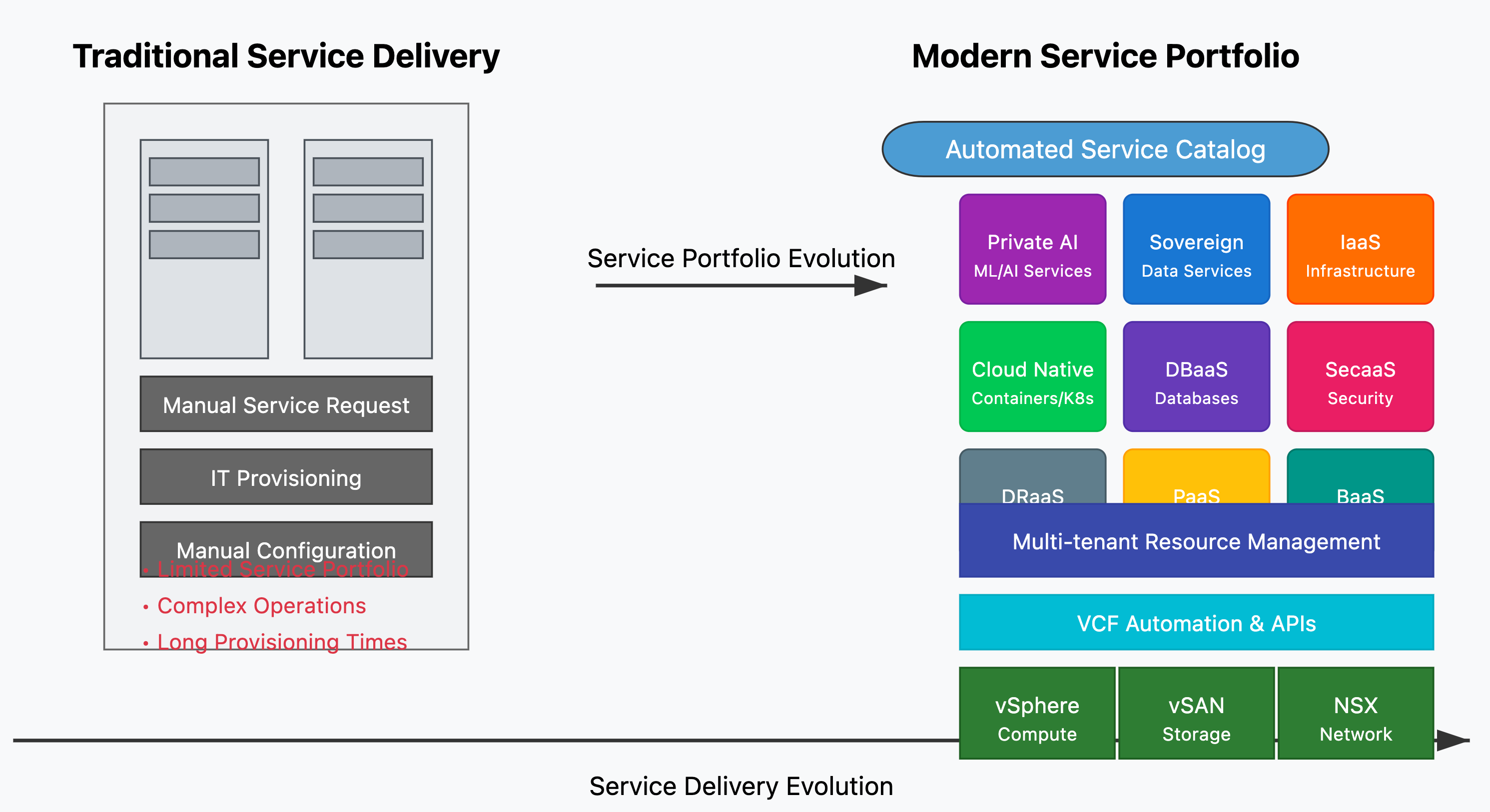
The IT landscape is undergoing a massive transformation. Traditional virtualization, which once revolutionized data centers, is now evolving into full-fledged cloud service delivery. Organizations are no longer just managing VMs; they are delivering scalable, secure, and AI-ready cloud platforms.
The Shift from Virtualization to Cloud Services
Virtualization has been the backbone of IT infrastructure for over a decade, enabling efficiency, consolidation, and improved resource utilization. However, as digital transformation accelerates, enterprises require more than just virtual machines. They need scalable, automated, and AI-powered cloud platforms that can meet the growing demands of modern workloads.
This shift is being powered by VMware Cloud Foundation (VCF)—the cornerstone of modern cloud infrastructure. With VCF, enterprises and Cloud Service Providers (CSPs) can move beyond virtualization to build multi-cloud, hybrid, and sovereign cloud environments with automation, security, and AI-driven capabilities at their core.
Key Benefits of VMware Cloud Foundation
✅ Unified Platform: Compute, storage, networking, and management are integrated into a single solution. ✅ Hybrid & Multi-Cloud Operations: Seamlessly run workloads across private, public, and hybrid cloud environments. ✅ Built-in Security & Compliance: Ensure data sovereignty and regulatory compliance with sovereign cloud initiatives. ✅ AI-Ready Infrastructure: GPU acceleration and private AI capabilities empower AI/ML workloads. ✅ Accelerated Cloud Service Delivery: Enable Cloud Providers & VMware Cloud Service Providers (VCSPs) to deliver next-gen cloud offerings.
The Significance of VMware Cloud Providers (VCSPs)
VMware Cloud Providers (VCSPs) play a pivotal role in enabling organizations to seamlessly transition from virtualization to cloud services. They extend the capabilities of VMware Cloud Foundation by offering:
🔹 Managed Cloud Services: Helping enterprises offload infrastructure management with fully managed VMware-based cloud environments. 🔹 Sovereign and In-Country Cloud Solutions: Ensuring compliance with regional data sovereignty laws while delivering cloud scalability. 🔹 Multi-Tenant Cloud Platforms: Empowering service providers to offer flexible, cost-effective cloud solutions with secure tenant isolation. 🔹 AI and GPU-Powered Cloud Services: Providing enterprises with AI-ready infrastructure to support next-gen workloads. 🔹 Disaster Recovery & Business Continuity: Offering reliable DRaaS (Disaster Recovery as a Service) to ensure business resilience.
Future of Cloud with VMware Cloud Foudation
As enterprises and service providers embrace cloud-first and AI-driven strategies, VCF is enabling them to deliver next-generation cloud services with agility, resilience, and efficiency. This evolution is not just about technology; it’s about unlocking new business opportunities, enhancing innovation, and driving digital transformation at scale.
With cloud-native applications, AI/ML workloads, and security-first cloud strategies becoming the new normal, the role of VMware Cloud Foundation is more critical than ever.
VMware Cloud Foundation is transforming the way cloud services are delivered, from the traditional virtualization model to highly flexible, customer-tailored cloud services. With the support of VCSPs, businesses are empowered to adopt cutting-edge cloud solutions faster and more efficiently than ever before.
With VMware Cloud Director 10.6.1, service providers gain greater flexibility and control over firewall configurations, ensuring compliance with licensing entitlements while delivering scalable, high-value security services. This update aligns with VMware Cloud Foundation (VCF) networking licensing, enabling providers to selectively offer the VMware Advanced Networking & Security (ANS) Add-On to customers based on their needs and cost agreements.
Impact of VMware NSX Licensing Changes
Recent changes to VMware’s NSX licensing model have significantly altered how firewall features are provisioned. Under the new structure:
Stateless Firewall is included in the VMware Cloud Foundation (VCF)
Stateful Firewall now requires an additional, separate license documented Here
This change impacts how service providers manage network security within VMware Cloud Director environments. To address these shifts, Cloud Director 10.6.1 introduces new controls that give providers flexibility in defining which firewall type—stateless or stateful—is available to their tenants. This ensures security policies align with business needs while optimizing costs associated with VMware licensing.
VMware Cloud Director with NSX supports both stateful and stateless firewalls, each serving different security needs:
What is a Stateless Firewall?
A stateless firewall inspects traffic on a per-packet basis without maintaining the state of active connections. Unlike stateful firewalls, which track the context of traffic flow, stateless firewalls apply predefined rules to each packet independently.
💡 Key Benefits: ✔ Faster packet processing for high-performance workloads. ✔ Ideal for perimeter protection and edge security use cases. ✔ Lower resource consumption compared to stateful firewalls.
Stateful vs. Stateless Firewalls in Cloud Director
Feature
Stateful Firewall
Stateless Firewall
Connection Tracking
✅ Maintains connection state
❌ No connection awareness
Security Context
✅ Applies rules based on traffic flow
❌ Evaluates each packet independently
Performance
Higher resource usage
Lightweight, optimized for speed
Configuring in Cloud Director
This feature is designed to help cloud service providers who wish to control which tenants can access Stateless/Stateful Firewall services. The goal is to enforce better governance over the consumption of advanced network services, such as Stateful Firewall and Distributed Firewall.
The license selection is made at the Edge Cluster level in VCD. The service provider determines which type of firewall can be applied to a specific Edge Cluster. Consequently, all Provider/Organization and vApp Edge Gateways utilizing that cluster will have firewall rules configured as either stateful or stateless, depending on the selection.
This will have corresponding changes in NSX, while The firewall rule configuration remains the same in vCD. below is the VMware Cloud Director (VCD) view of the Org VDC Edge Gateway firewall configuration deployed on an Edge Cluster designated with the stateless firewall option inside NSX Manager.
NOTE : Changing an Edge Cluster from Stateful to Stateless or vice versa will not impact existing deployed Gateways.
Gateway Firewall Enforcement Control in VCD
One key use case is when a service provider or tenant is using an appliance-based third-party firewall instead of the NSX-integrated firewall in Cloud Director. In such cases, they may not require NSX-based firewall enforcement and prefer to manage security through their own solution. This feature allows them to disable the NSX firewall, ensuring flexibility in security architecture without unnecessary conflicts.
Now with this release both service providers and tenants can disable or enable the firewall at the Provider or Org Gateway level without removing existing firewall rules. A new “Active” switch has been introduced in the Firewall UI (top right corner), allowing users to toggle firewall enforcement as needed while preserving the configured rules.
Conclusion
The new firewall flexibility in Cloud Director 10.6.1 ensures that service providers can:
✅ Optimize licensing costs by choosing stateless or stateful firewall options. ✅ Align security offerings with customer needs. ✅ Enhance governance and compliance around advanced network security services. ✅ Seamlessly integrate third-party firewall solutions into their cloud environments.
By leveraging these new capabilities, Cloud Director providers can deliver scalable, efficient, and cost-effective security solutions while adapting to the evolving VMware NSX licensing model.
In today’s rapidly evolving cloud landscape, integrating robust data management solutions is crucial for maintaining efficiency and scalability. VMware’s Data Services Manager (DSM) offers a comprehensive suite of tools to manage data services, and when integrated with VMware Cloud Director (VCD) and the Data Solutions Extension (DSE), it provides a powerful platform for cloud providers and their tenants. Integrating VMware DSM with VCD and DSE offers several advantages:
Automation: Integration with VCD’s automation capabilities enables streamlined deployment and management of databases.
Self-Service DBaaS: Tenants can easily provision and manage databases like MySQL, PostgreSQL, etc., without admin intervention.
Centralized Management: Service providers maintain full control and visibility over all database services provisioned by tenants.
Scalability: Easily scale database instances as per tenant demand, with seamless multi-tenant support.
Overview of VMware Data Services Manager (DSM)
VMware Cloud Director extension for Data Solutions offers a simple tenant-facing self-service UI for the lifecycle management of data solutions with a single view across multiple instances, and with URL to individual instances for service specific management. Service instances are deployed in the service provider’s VMware Cloud Director-managed VMware vSphere or VMware Tanzu Kubernetes Grid on-premises infrastructure. The full stack – management to individual data services – is VMware-supported and available on a consumption basis. Service providers have a choice to offer VMware Cloud Director extension for Data Solutions as self-service to data-experienced tenant customers, as a managed data service, or as a sovereign cloud data service. This extension widens VMware Cloud Director’s multi-tenant-safe cloud consumption surface to support the following data solutions.
VMware Data Services Manager MySQL
VMware RabbitMQ
VMware SQL with Postgres and VMware SQL with MySQL
Mongo DB Enterprise Advanced and Community editions
Apache Kafka – Confluent Platform
VMware Data Services Manager Postgres
Prerequisites
Before you begin the integration, ensure you have the following:
A deployed VMware Cloud Director instance.
VMware Data Services Manager installed and configured.
A prepared Tanzu Kubernetes Grid (TKG) cluster.
Steps for Integration
Install and Configure VMware DSM
VMware DSM simplifies data services management by offering a platform for tenants to provision, manage, and monitor their databases. Here’s how to set it up:
Deploy DSM:
Deploy the VMware DSM appliance in your VMware environment.
Ensure DSM is connected to your Cloud Director and vSphere environment, with access to required resources for provisioning database instances.
Configure Data Services:
Within DSM, configure the data services you wish to offer to tenants, such as MySQL, PostgreSQL, MongoDB, etc.
Define database service policies, such as backup policies, storage configurations, and high availability options.
Create Tenant-specific Database Templates:
Create database templates or pre-configured service offerings for different tenants, specifying the parameters such as CPU, memory, storage, and network configurations.
For more details on how to setup DSM see – set up the infrastructure policy and backup locations in the VMware Data Services Manager portal, see the VMware Data Services Manager Documentation.
Data Solution Extension Integration with DSM
The VMware Cloud Director Extension for Data Solutions is a powerful plug-in designed to enhance VMware Cloud Director by adding data and messaging services to its portfolio. This extension enables cloud providers to offer a variety of on-demand data services to their tenants, including:
VMware SQL with MySQL
VMware SQL with PostgreSQL
RabbitMQ
Kafka
Mongo DB
Now to Integrate DSE with DSM follow below steps:
Access your VMware Cloud Director instance and navigate to the Data Solutions Extension.
Go to Settings > DSM Integration within the Data Solutions Extension interface
Choose the TKG cluster (this is provider hosted K8s Cluster) where you want to deploy the data services operatorr and click Next.
Follow the prompts to install the Data Solutions operator. This process typically takes a few minutes.
Enter the necessary details to connect VMware DSM with the Data Solutions Extension and click Connect
Define infrastructure policies and backup locations within the VMware DSM portal to ensure data protection and compliance.
Publish to Tenants
Once the integration is complete, you can publish VMware DSM PostgreSQL and MySQL solutions to tenant organizations.
Enter your user name and password, and click Sign In.
In the primary left navigation panel, click More > Data Solutions.
Select version required and enter required details to deploy a database
Tenant Self Service – Backup/Restore
You can protect your data solution instances by backing them up to an S3 location and restoring them to a new instance
You can backup solution instances on-demand or by using a custom backup schedule. You can back up and restore VMware SQL with Postgres, VMware SQL with MySQL, VMware Data Services Manager MySQL, and VMware Data Services Manager Postgres instances.
Tenant Self Service – Upgrade
You can upgrade the available data solutions and their instances within the VMware Cloud Director extension for Data Solutions.
Upgrade a solution
Select the upgrade version and Acknowledge that you have read and completed the pre-upgrade actions and click Upgrade.
Integrating VMware Data Services Manager with VMware Cloud Director and the Data Solutions Extension is a strategic move for cloud providers looking to enhance their service offerings. By following the steps outlined above, you can streamline your data management processes, improve scalability, and deliver a superior experience to your tenants.
As businesses’ cloud strategies evolve, many are reconsidering their reliance on public cloud environments and exploring the benefits of private cloud solutions. Public clouds like AWS, Azure, and Google Cloud offer flexibility and scalability, but they also come with challenges such as unpredictable costs, security concerns, and limited control. This is where VMware Cloud Service Providers (CSPs), powered by VMware Cloud Foundation (VCF), present a compelling alternative for businesses looking to transition from public to private cloud. Here’s why customers should choose a VMware CSP when making this move:
1. Predictable Costs and Better Financial Control
Public Cloud Challenge: The pay-as-you-go model of public clouds is attractive at first but often leads to unpredictable and escalating costs. Usage spikes, data transfer fees, and networking costs can cause budget overruns, making it difficult for businesses to manage long-term financial planning.
VMware CSP Advantage: With VMware Cloud Foundation hosted by a VMware CSP, costs become more predictable and fixed. Unlike public clouds, where charges can fluctuate based on consumption, VMware CSPs offer stable pricing tailored to the customer’s dedicated infrastructure needs. This leads to greater financial control and ensures that businesses can plan their budgets with confidence, avoiding unexpected bills and cost surges.
2. Enhanced Security and Compliance
Public Cloud Challenge: While public cloud providers maintain infrastructure security, customers are responsible for securing their data. This shared responsibility model introduces potential security gaps, especially in multi-tenant environments where data is more exposed. For industries with strict regulatory requirements, such as healthcare and finance, managing compliance in a public cloud can be challenging.
VMware CSP Advantage: VMware Cloud Service Providers offer private, dedicated infrastructure, giving businesses full control over their security protocols. VMware Cloud Foundation includes built-in features like NSX micro-segmentation, end-to-end encryption, and automated compliance controls to ensure robust security. This infrastructure meets the stringent security needs of industries like government and financial services, making it easier for organizations to comply with regulations such as GDPR, HIPAA, and PCI-DSS.
By choosing a VMware CSP, businesses can deploy their own security policies and governance measures, ensuring full compliance without the risks associated with public cloud environments.
3. Consistent Performance and Infrastructure Customization
Public Cloud Challenge: Public clouds are designed to serve a broad range of customers, leading to performance variability. The shared, multi-tenant nature of public clouds can cause resource contention, which negatively impacts performance for businesses with mission-critical workloads. Additionally, public cloud platforms offer limited options for customizing infrastructure to optimize specific workloads.
VMware CSP Advantage: With a VMware CSP, businesses gain access to dedicated infrastructure that provides consistent, reliable performance. VMware Cloud Foundation allows companies to customize their private cloud environments, tuning resources to meet the exact demands of high-performance workloads like AI/ML, enterprise applications, or data-intensive tasks. This ensures optimal performance and avoids the unpredictable resource contention seen in public cloud environments.
4. Full Control Over Data and Infrastructure
Public Cloud Challenge: In a public cloud setup, businesses often lose a degree of control over their data and infrastructure, as public cloud providers manage the underlying systems. This can lead to vendor lock-in, where organizations are restricted to the cloud provider’s tools and architecture, making it difficult to adapt or migrate workloads.
VMware CSP Advantage: VMware Cloud Foundation offers businesses full control over their infrastructure, ensuring flexibility and freedom. With a VMware CSP, organizations are not bound by the limitations of a public cloud vendor’s ecosystem. Instead, they can manage and operate their private cloud environment according to their own policies and tools, retaining ownership of their data and ensuring it is managed and stored in compliance with their internal standards.
Moreover, VMware CSPs provide a vendor-neutral platform, reducing the risk of cloud lock-in and enabling smoother transitions to other cloud models if needed.
5. Simplified Compliance and Data Residency
Public Cloud Challenge: Many businesses must comply with strict regulations around data residency and sovereignty, requiring data to be stored and processed within specific regions. While public clouds offer region-based services, maintaining compliance can be complex due to the global nature of their infrastructure and multi-tenant environments.
VMware CSP Advantage: VMware Cloud Service Providers offer private cloud environments where data residency is easily enforced, ensuring that sensitive information remains within required geographic boundaries. Organizations can select specific data center locations that comply with local laws and regulatory requirements, providing greater control over data governance. This is crucial for industries like finance, healthcare, and government, where compliance and data sovereignty are paramount.
6. Hybrid and Multi-Cloud Flexibility
Public Cloud Challenge: Public clouds are optimized for running workloads within their own ecosystem, making hybrid or multi-cloud strategies more complex. This often results in vendor lock-in, where businesses are limited to the services and infrastructure of a single cloud provider.
VMware CSP Advantage: VMware Cloud Foundation is designed for hybrid and multi-cloud environments, offering businesses the flexibility to run workloads across private clouds, on-premises infrastructure, and public clouds (via VMware Cloud on AWS, Azure VMware Solution, or Google Cloud VMware Engine). This allows businesses to choose the best environment for each workload while maintaining a consistent management experience across clouds. VMware CSPs provide the best of both worlds, enabling seamless hybrid cloud operations without sacrificing control or flexibility.
7. Long-Term Cost Efficiency and Lower Total Cost of Ownership (TCO)
Public Cloud Challenge: Public clouds are ideal for elastic workloads but can become costly for steady-state or predictable workloads. Over time, businesses may find that public cloud environments become less efficient, with resources underutilized or costs outpacing usage.
VMware CSP Advantage: Private clouds hosted by VMware CSPs offer a more cost-efficient solution for businesses with predictable workloads. By shifting to a fixed-cost private cloud model, organizations avoid the long-term costs of over-provisioning in the public cloud. VMware Cloud Foundation optimizes resource utilization, ensuring infrastructure is used efficiently, leading to a lower total cost of ownership (TCO) over time.
For enterprises looking to stabilize their operational costs while maintaining cloud-level flexibility, VMware CSPs provide a long-term financial advantage compared to public cloud platforms.
Conclusion
Transitioning from public cloud to a private cloud environment hosted by a VMware Cloud Service Provider offers businesses a powerful combination of predictable costs, enhanced security, control, and customized infrastructure. VMware CSPs allow organizations to regain control over their data and operations, ensure compliance with stringent regulatory requirements, and optimize performance for mission-critical applications.
For enterprises seeking a strategic balance between cloud agility and operational control, VMware Cloud Service Providers are the ideal partners to support a seamless and effective move from public cloud to private cloud.
In today’s dynamic business environment, enterprises are increasingly seeking agile and scalable private cloud solutions. VMware partners are uniquely positioned to capitalize on this trend, and vSAN, VMware’s software-defined storage solution, is a powerful tool to add to your private cloud arsenal. Let’s delve into why vSAN, with its new licensing model and advanced architecture, is a strategic asset for building compelling private cloud offerings.
The Private Cloud Imperative
Organizations are looking to migrate to private clouds ( on prem or partner hoststed or partner managed ) to gain greater control, flexibility, and security over their IT infrastructure. Private clouds offer several advantages:
Security and Compliance: Maintain control over data and applications within a secure, private environment.
Improved Resource Utilization: Consolidate resources and eliminate silos, leading to more efficient allocation and utilization.
Enhanced Agility: Rapidly provision and scale resources to meet changing business demands.
vSAN: The Bedrock of a Robust Private Cloud
vSAN plays a critical role in building a feature-rich private cloud solution. Here’s how it empowers partners with a new licensing model and advanced architecture:
Simplified Infrastructure Management: vSAN integrates seamlessly with existing VMware tools, streamlining provisioning, deployment, and management of private cloud infrastructure.
Scalability on Demand: Effortlessly scale storage and compute resources within your private cloud to accommodate business growth.
Reduced Operational Costs: The software-defined nature of vSAN eliminates the need for expensive, dedicated storage hardware, leading to significant cost savings.
New vSAN Licensing Model: The recent shift to a per-core consumption model offers predictable pricing (VCF provides 1 TiB of vSAN entitlement for each VCF core purchased), allowing you to accurately forecast costs and deliver competitive private cloud solutions.
vSAN Express Storage Architecture (ESA): The ESA is optimized to exploit the full potential of the very latest in hardware and unlocks new capabilities, simplifies deployment and streamlines management for private cloud environments.
Power of ESA
The Express Storage Architecture in vSAN 8 stands on the shoulders of much of the architecture found in OSA included in previous versions of vSAN, and vSAN 8. vSAN had already solved many of the great challenges associated with distributed storage systems, and we wanted to build off of these capabilities while looking at how best to optimize a data path to reflect the capabilities of today’s hardware.
The advances in architecture primarily come from two areas, as illustrated in below figure:
An optimized log-structured object manager and data structure. This layer is a new design built around a new high-performance block engine and key value store that can deliver large write payloads while minimizing the overhead needed for metadata. The new design was built specifically for the capabilities of the highly efficient upper layers of vSAN to send data to the devices without contention. It is highly parallel and helps us drive near device-level performance capabilities in the ESA.
A new patented log-structured file system. This new layer in the vSAN stack – known as the vSAN LFS – allows vSAN to ingest new data fast and efficiently while preparing the data for a very efficient full stripe write. The vSAN LFS also allows vSAN to store metadata in a highly efficient and scalable manner.
vSAN Max is a distributed scale-out storage system for vSphere clusters. It is powered by the vSAN ESA, so it offers the capabilities that are a part of the ESA, but serves as a storage-only cluster. It uses vSAN’s native protocol and data path for cross-cluster communication, which preserves the management experience and provides the highest levels of performance and flexibility for a distributed storage system.
vSAN offers more than just operational benefits. Here’s how it elevates your private cloud proposition:
Faster Time to Market: The rapid deployment capabilities of vSAN, allow you to deliver private cloud solutions to clients quickly and efficiently.
Improved Service Delivery: vSAN’s inherent performance and scalability, coupled with vSAN MAX for demanding workloads, enable you to offer high-performance private cloud environments for any customer need.
Enhanced Security: vSAN integrates with VMware security features, allowing you to build private clouds that meet stringent security compliance requirements.
Partnering for Private Cloud Success
To maximize your success with vSAN in the private cloud domain or VMware based public cloud domain, consider these steps:
Develop Private Cloud Expertise: Invest in training and resources to build a team of experts proficient in designing, deploying, and managing private cloud solutions with vSAN, including the new licensing model and vSAN ESA architecture.
Craft Compelling Private Cloud Packages: Develop standardized or customizable private cloud packages that leverage vSAN’s strengths to address specific customer needs, including options for cost-optimized vSAN configurations or high-performance vSAN MAX deployments.
Showcase Customer Success Stories: Demonstrate the value proposition of vSAN-powered private clouds through successful client case studies and testimonials, highlighting the benefits of the new licensing model, vSAN ESA, and vSAN MAX for diverse private cloud requirements.
Conclusion
VMware partners have a tremendous opportunity to lead the private cloud charge. By embracing VMware vSAN, its new licensing model, advanced vSAN ESA architecture, and the power of vSAN MAX, you can empower businesses to thrive in the digital age. Invest in vSAN expertise, craft compelling private cloud offerings, and watch your business soar as a trusted advisor in the private cloud revolution.
VMware Cloud Director OIDC Integration with VMware Workspace ONE Access
Prerequisite
VMware Workspace access ONE must be already deployed.
VMware workspace access ONE must be configured with a directory service source for users and groups.
Cloud Director must be installed and configured for provider and tenant organizations.
Bill of Material
VMware Cloud Director 10.5.1
VMware Workspace ONE Access 23.09.00
Steps to Configure Workspace ONE Access for OIDC Authentication
Workspace ONE Access uses OAuth 2 to enable applications to register with Workspace ONE Access and create secure delegated access to applications. In this case, we will use Cloud Director to integrate with Workspace One Access.
In the Workspace ONE Access console Settings>OAuth 2.0Management page, click ADD CLIENT.
In the Add Clientpage, configure the following.
Label
Description
Access Type
Set to User Access Token
Client ID
Enter a unique client identifier for the Cloud Director Organization (System/Tenant)
Grant Type
Authorization Code Grant – When you select Authorization Code Grant, the Redirect URI setting is displayed under Grant Type. Refresh Token Grant – is enabled by default when the Issue refresh token setting is enabled. If you deactivate Issue refresh token, the Refresh Token Grant type is not checked.
Redirect URI
Retrieve this from VCD Provider/Tenant portal at: https://[VCD Endpoint]/(provider or tenant/[orgname])/administration/identity-providers/oidcSettings
Scope
The scope defines which part of the user’s account the token can access. The scopes you can select from include Email, Profile, User, NAPPS, OpenID, Group, and Admin.
Issue refresh token
To allow for the return of a refresh token, leave this option enabled.
Refresh token TTL
Set the Refresh Token time to live value. New access tokens can be requested until the refresh token expires.
Access token TTL
The access token expires in the number of seconds set in Access Token TTL. If Issue Refresh Token is enabled, when the access token expires, the application uses the refresh token to request a new access token.
Idle Token TTL
Configure how long a refresh token can be idle before it cannot be used again.
Token Type
For Workspace ONE Access, the token type is Bearer Token.
User Grant
Prompt users for scope acceptance is disabled. If Enabled users are shown message that lists the scopes that are being sent.
Click SAVE. The client page is refreshed and the Client ID and the hidden Shared Secret are displayed.
Copy and save the client ID and generated shared secret.
Note: If the shared secret is not saved or you lose the secret code, you must generate a new secret, and update in Cloud Director that uses the same shared secret with the regenerated secret. To regenerate a secret, click the client ID that requires a new secret from the OAuth 2.0 Management page and click REGENERATE SECRET.
Steps to configure VMware Cloud Director to use Workspace ONE Access for Provider/Tenant users and groups
From the top navigation bar, select Administration.
In the left panel, under Identity Providers, click OIDC or directly you can browse: https:// [VCD Endpoint]/(provider or tenant/[orgname])/administration/identity-providers/oidcSettings
If you are configuring OIDC for the first time, copy the client configuration redirect URI and use it to create a client application registration with an identity provider that complies with the OpenID Connect standard, for example, VMware Workspace ONE Access. (this has already been done above)
Click Configure
Verify that OpenID Connect is active and fill in the Client ID and Client Secret you created in VMware Workspace ONE Access as above during client creation.
To use the information from a well-known endpoint to automatically fill in the configuration information, turn on the Configuration Discovery toggle and enter a URL at the site of the provider that VMware Cloud Director can use to send authentication requests to. Fill in the IDP Well-known Configuration Endpoint field with the value: https://ws01 URL/SAAS/auth/.well-known/openid-configuration
Click next.
If everything is correctly configured, the below information will automatically get populated, keep a note we are using the User Info endpoint.
VMware Cloud Director uses the scopes to authorize access to user details. When a client requests an access token, the scopes define the permissions that this token has to access user information, enter the scope information, and clickNext.
Since we are using User Info as an access type, map the claims as below and click Next.
NOTE: At the claims mapping step, the Subject theme will be default populated with “sub” which will mean that VCD users will have the username format “[username]@XXX”. If you want to import the users to VCD with a different format, you can change the Subject theme to map to “email” and then import users to VCD using the email address attached to the account.
This is the most critical piece of configuration. Mapping this information is essential for VCD to interpret the token/user information correctly during the login process.
Login as an OIDC GROUP Member User
In the Provider/Tenant organization’s Administration Page, import OIDC groups and map them to existing VCD roles.
NOTE: In case you don’t see the “IMPORT GROUPS” button, refresh the page, and you will see the desired button IMPORT GROUPS
User go to https:// [VCD Endpoint]/(provider or tenant/[orgname])
The user should be redirected to the Workspace ONE Access login page. Users can log in with the user in the group.
The user will be redirected back to VCD and should now be fully logged in.
After the first successful login, the organization administrator can see the newly auto-imported user.
Login as an OIDC User
In the Provider/Tenant organization’s Administration Page, import OIDC users and map them to existing VCD roles.
The user should be redirected to the Workspace ONE Access login page and log in there.
The user will be redirected back to VCD and should now be fully logged in.
If you get the SSO Failure page double-check that you imported to the correct group/user and that the username format is correct. For additional information, you can check Here and for troubleshooting and about configuring additional logging, you can check the official documentation here.
Multi-Tenancy was introduced in NSX UI starting from VMware NSX 4.1 and now commencing with version 10.5.1, VMware Cloud Director introduces support for NSX multi-tenancy, facilitating direct alignment of vcd organizations with NSX projects.
What are NSX Projects ?
A project in NSX functions akin to a tenant. Creating projects enables the separation of security and networking configurations among different tenants within a single NSX setup.
Multi-tenancy in NSX is achieved by creating NSX projects, where each project represents a logical container of network and security resources (a tenant). Each project can have its set of users, assigned privileges, and quotas. Multi-tenancy serves various purposes, such as providing Networking as a Service, Firewall as a Service, and more.
How NSX Projects relate to Cloud Director Organizations?
Within the VCD platform, the tenancy is established via Organizations. Each tenant receives its exclusive organization, ensuring a distinct and isolated virtual infrastructure tailored to their tasks. This organizational setup grants precise control over tenant access to resources, empowering them to oversee Users, Virtual Data Centers (VDCs), Catalogs, Policies, and other essentials within their domain.
To clearly outline the tenant structure, VMware NSX introduced a feature known as Projects. These Projects allocate NSX users to distinct environments housing their specific objects, configurations, and monitoring mechanisms based on alarms and logs.
With VCD 10.5.1, management functionalities tied to NSX Tenancy fall within the exclusive purview of the Provider. NSX Tenancy operates on an Organization-specific level within VCD. When activated, a VCD Organization aligns directly with an NSX Project.
VCD drives and manages the creation of the associated NSX project, allowing the User to configure the project identifier. The NSX project is actually created during the creation of the first VDC in the organization for which you activated NSX tenancy. The name of the NSX project is the same as the name of the organization to which it is mapped.
How to enable?
The Cloud Provider can enable the NSX Tenancy for a specific Organization by going into the Cloud Director Organization section, choosing an organization, and selecting “NSX Tenancy”, he/she can also define a Log Name, which will be the Organization’s unique identifier in the backing NSX Manager logs.
The name of the NSX project will be the same as the name of the organization to which it is mapped.
Once NSX tenancy has been activated on the Org level, the Cloud provider can create a new Org VDC and choose to enable “NSX Tenancy”, this is when The NSX project is actually get createdin NSX.
NOTE: Network Pool selection is disabled. This is because NSX supports Project creation only in the default overlay Transport Zone. Also, make sure the default overlay Transport zone already exists.
Note: If you choose not to activate NSX tenancy during the creation of an organization VDC, you cannot change this setting later.
When not to choose to enable tenancy?
Some use cases do not require organization VDC participation in NSX tenancy, for example, if the VDC only needs VLAN networks. Additionally, organization VDCs using NSX tenancy are restricted to using the network pool that is backed by the default overlay transport zone, so, in order to be able to use a different network pool, you might wish to opt out of NSX tenancy.
also there are a few features that NSX projects do not support today, like NSX Federation deployments as well as not all Edge Gateway features are available for Networking Tenancy-enabled VDCs like VPNs (IPsec/L2) and sharing segment profile templates, etc.. so work in progress and will see more and more features coming in future.
Conclusion
Aligning NSX Projects with VCD’s Tenancy ensures customers access an extensive array of networking capabilities offered by the NSX Multi-tenancy solution. Among these crucial functionalities is tenant-centric logging for core VCD networking services like Edge Services and Distributed firewalls. Additionally, integrating NSX Projects paves the way to investigate potential enhancements, facilitating tenant self-service login capabilities within VCD features. Below, you can find more information and capabilities.