Tag: #VCSP

  • VCF 9 – Updating the Supervisor Service

    VCF 9 – Updating the Supervisor Service

    Supervisor and VKS clusters are built using a common Kubernetes distribution core, but their Kubernetes versions are delivered differently. Starting with VCF 9, Supervisor Kubernetes releases are delivered independently of vCenter. You can update the Supervisor version by deploying a release from the Supervisor Content Library. In this blog post, we will walk through the Supervisor update process step by step. Let’s get started!

    Create and Configure a Subscribed Content Library for Supervisor Images

    For vSphere Supervisor, VMware publishes Supervisor images through a content delivery network (CDN). To enable or upgrade vSphere Supervisor, you can create a Subscribed Content Library that synchronizes with the Supervisor release images.

    You can configure the content library in either Immediate or On-Demand synchronization mode. Note that immediate synchronization from the public CDN may require more time and consume additional disk space.

    • Log in to vCenter as a vSphere administrator.
    • From the Home menu, select Content Libraries
    • Click Create
    • Provide a name for the library (for example, supervisor update library) and click Next.
    • On the Configure Content Library page, select Subscribed Content Library.
    • In the Download content section, select the synchronization mode of the content library and click Next
    • When prompted, accept the SSL certificate thumbprint.The thumbprint will remain stored on your system until the subscribed content library is removed from the inventory
    • Apply Security Policy click Next
    • On the Add storage page, select a datastore as a storage location for the content library contents and click Next.
    • Review the details and click Finish

    Assign the content library to the vSphere Supervisor platform

    • on vCenter go to Home menu, select Supervisor Management
    • Select Content Distribution.
    • On the Supervisor Images Library card, click Assign
    • Select the Content Library that created above and click Assign
    • The new content library begins synchronizing, which may take some time. After synchronization is complete, the new Supervisor Kubernetes versions included in the images will appear under the Updates tab

    Apply Updates

    • Select the Available Version you want to update to. For example: v1.30.10+vmware.1-fips-vsc9.0.0.0100. ⚠️ Updates must be applied incrementally. You cannot skip versions (e.g., upgrading directly from 1.28 to 1.30). The correct sequence is 1.28 → 1.29 → 1.30.
    • Select a Supervisor to update and click Apply Updates

    The system runs a series of pre-checks to verify the compatibility of the different components against the Supervisor Kubernetes version to which you want to update.

    Learn which are the pre-checks that are run before updating the supervisor and how to troubleshoot in case of errors resulting from failed pre-checks, HERE

    When the pre-checks are completed successfully, you can update the Supervisor.

    Upgrading the VMware vSphere Supervisor service is a critical step in maintaining a secure, stable, and feature-rich VMware Cloud Foundation environment. By following best practices—planning incremental updates, leveraging subscribed content libraries, and validating compatibility at every stage—administrators can ensure minimal downtime while keeping workloads and Kubernetes clusters up to date. Regular Supervisor upgrades not only enhance platform capabilities but also strengthen the foundation for running modern applications, containers, and cloud-native services efficiently and reliably.

  • VCF Automation – Tenant Management

    VCF Automation – Tenant Management

    In today’s multi-tenant cloud environments, VMware Cloud Foundation Automation (VCFA) offers a robust layered architecture that seamlessly bridges enterprise-grade infrastructure management with developer-ready self-service capabilities.

    By clearly separating responsibilities—from VMware Cloud Service Providers who manage the physical and virtual infrastructure, to organization administrators who allocate resources, and finally to developers who consume them—VCFA enables efficient resource governance, operational consistency, and scalability. This structured approach not only supports multi-tenancy and workload isolation but also accelerates innovation by empowering end users to deploy applications and services quickly within well-defined boundaries.

    Why Tenant Management Matters?

    Tenant management is more than just dividing resources—it’s about ensuring cost efficiency, security, scalability, and compliance in a shared infrastructure. In VCFA, these capabilities allow VMware Cloud Service Providers to maximize utilization without compromising performance or governance for individual tenants.

    Key concepts to understand from both the Provider and Tenant perspectives:

    Projects

    Projects control user access to namespaces and user ownership of provisioned resources. All organizations are created with a default project. The default project is empty and does not have any namespaces or users.

    Example: A VMware Cloud Service Provider might assign a dedicated project to each customer department for clearer billing and isolation.

    Regions

    The Regions page lists all the regions where the organization has a quota in. Organizations can have a quota in one or many regions. Your provider administrator assigns the regional quota to your organization. Quota in a region can come from one or many vSphere Zones within that region.

    Example: A global enterprise hosted by a VMware Cloud Service Provider might have quotas in Asia and Europe to ensure low-latency access for local teams.

    Namespace Class

    Namespace classes are templates for namespace provisioning. These templates can be used to standardize namespace attributes, like utilization limits, reservations, VM classes, storage classes, and content libraries. organizations comes preconfigured with three default namespace classes (small, medium, and large), which are meant to serve as example templates. The only different attributes among these built-in templates are the CPU and Memory limits. Administrators can use these templates as-is or can modify them to suit their needs.

    Namespace

    Projects are the central construct for organizing and allocating infrastructure resources to tenants or teams. As the organization administrator, you manage and distribute infrastructure by assigning namespaces to projects. When configuring a project, you must add at least one namespace so that users within the project can begin provisioning workloads such as virtual machines, VMware Kubernetes Service (VKS) clusters, or other supported resources. Namespaces act as scoped resource pools, defining limits for CPU, memory, and storage to ensure fair allocation and performance consistency. Each namespace is tied to a Virtual Private Cloud (VPC) and a namespace class, which in turn is associated with at least one zone to determine placement and availability. This structure not only enforces resource governance but also enables automation workflows to deploy consistently within predefined boundaries. All organizations are created with a default project, which is initially empty and contains no namespaces or users, providing a baseline starting point for configuration.

    Example: A tenant of a VMware Cloud Service Provider might create separate namespaces for development and production to avoid accidental resource conflicts.

    Virtual Private Clouds (VPCs)

    A Virtual Private Cloud (VPC) in VMware Cloud Foundation Automation (VCFA) offers an isolated networking environment that can be associated with one or more namespaces. Organizations can create multiple VPCs and assign each to specific namespaces based on workload or isolation requirements.

    Each VPC is an independent network and supports three types of IP address spaces, each offering different levels of reachability:

    • Private CIDRs: These addresses are internal to the VPC and are not routable outside without NAT. They are managed by the VPC administrator and do not need to be globally unique, allowing reuse across multiple VPCs.
    • TGW Private IP Blocks: These IP blocks are scoped at the organization level and are advertised through the Transit Gateway (TGW) within the organization. Organization admins define these blocks, and project admins can allocate subnets from them for their VPCs. This enables direct communication between VPCs in the same organization using the TGW Private IP space.
    • External IP Blocks: Managed by the provider admin, these IPs enable outbound access through Source NAT. Organization admins can assign subnets from provider-defined external blocks, giving workloads external connectivity while still using internal addressing.

    You can choose to deploy a separate VPC per namespace for stricter isolation, or share a VPC across namespaces where network separation is not required.

    Transit Gateways

    Each organization has a transit gateway which provides connectivity to the provider gateway within the organization. One or more VPCs are connected to the transit gateway, and that connection is defined by a VPC connectivity profile. Each VPC has connected workloads and a private subnet. SNAT rules translate addresses from this private subnet to a public address in the IP spaces block. This infrastructure enables the organization and its workloads to connect to external networks.

    You can view what transit gateways are available to your organization on the Manage & Govern > Networking > Transit Gateways page.

    IP Management

    Provider can use IP Spaces to manage their IP address allocation needs. IP Spaces provide a structured approach to allocating public IP addresses to different organizations, enabling connectivity to external networks.

    An IP space consists of a set of CIDR blocks that are reserved, these CIDRs must be dedicated to  and used by organization administrators as they configure services. An IP space can only be IPv4.

    Organization administrators can create and manage the private IP blocks within their organization. there tenant can view external IP address blocks assigned to this organization by a provider. You can also create and view private TGW IP address blocks for the entire organization to use. Finally, you can view private VPC IP address blocks that are applicable to specific VPCs.

    In essence, VMware Cloud Foundation Automation’s tenant management capabilities provide a structured, role-based framework for organizing projects, namespaces, VPCs, transit gateways, and IP resources. By aligning provider and tenant responsibilities, VMware Cloud Service Providers ensure secure isolation, consistent governance, and streamlined automation—empowering organizations to scale efficiently while maintaining full control over infrastructure and networking resources.

  • From Virtualization to Cloud Service Delivery with VMware Cloud Foundation & VCSPs

    From Virtualization to Cloud Service Delivery with VMware Cloud Foundation & VCSPs

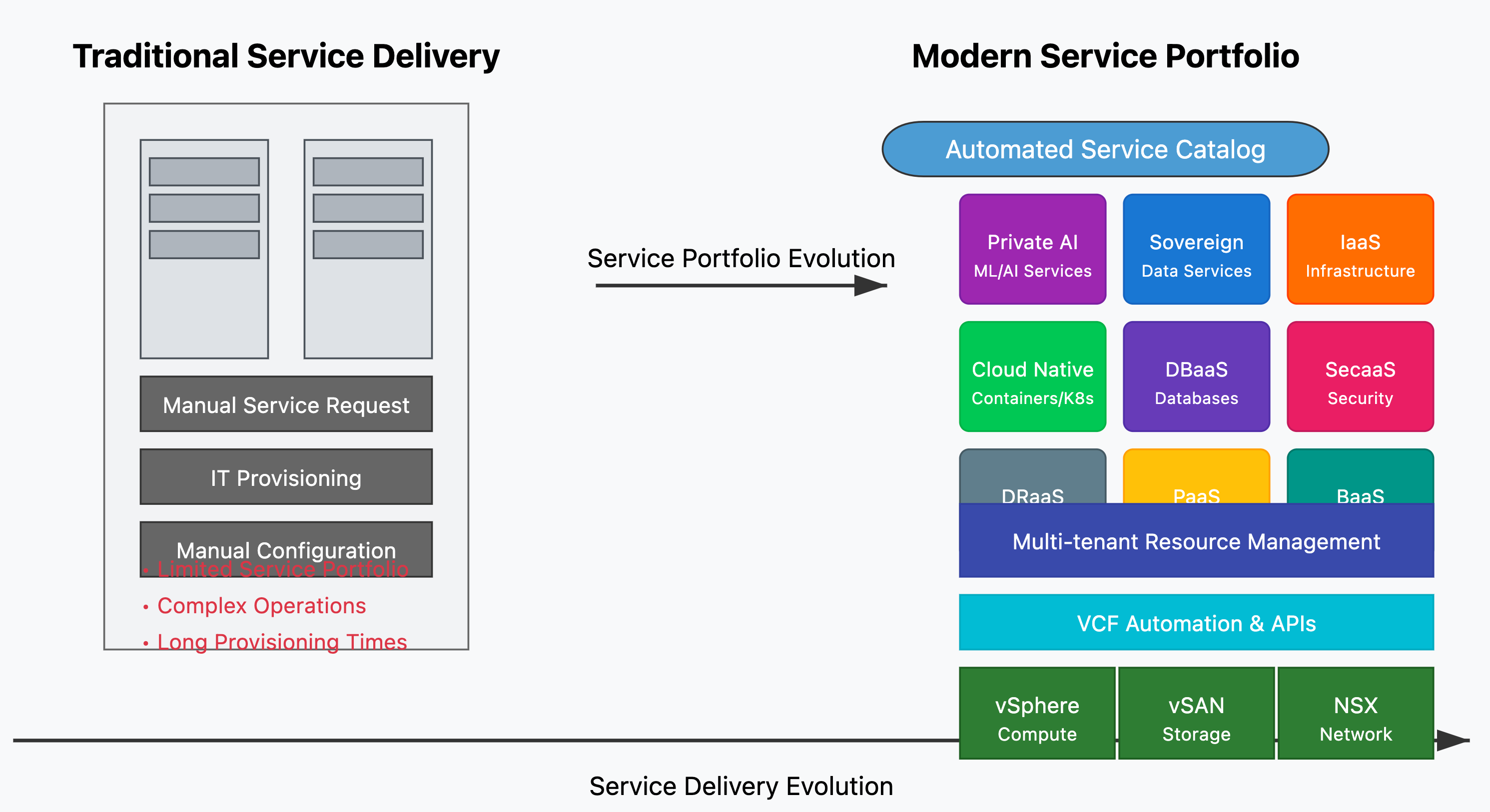
    The IT landscape is undergoing a massive transformation. Traditional virtualization, which once revolutionized data centers, is now evolving into full-fledged cloud service delivery. Organizations are no longer just managing VMs; they are delivering scalable, secure, and AI-ready cloud platforms.

    The Shift from Virtualization to Cloud Services

    Virtualization has been the backbone of IT infrastructure for over a decade, enabling efficiency, consolidation, and improved resource utilization. However, as digital transformation accelerates, enterprises require more than just virtual machines. They need scalable, automated, and AI-powered cloud platforms that can meet the growing demands of modern workloads.

    This shift is being powered by VMware Cloud Foundation (VCF)—the cornerstone of modern cloud infrastructure. With VCF, enterprises and Cloud Service Providers (CSPs) can move beyond virtualization to build multi-cloud, hybrid, and sovereign cloud environments with automation, security, and AI-driven capabilities at their core.

    Key Benefits of VMware Cloud Foundation

    âś… Unified Platform: Compute, storage, networking, and management are integrated into a single solution.
    âś… Hybrid & Multi-Cloud Operations: Seamlessly run workloads across private, public, and hybrid cloud environments.
    âś… Built-in Security & Compliance: Ensure data sovereignty and regulatory compliance with sovereign cloud initiatives.
    âś… AI-Ready Infrastructure: GPU acceleration and private AI capabilities empower AI/ML workloads.
    âś… Accelerated Cloud Service Delivery: Enable Cloud Providers & VMware Cloud Service Providers (VCSPs) to deliver next-gen cloud offerings.

    The Significance of VMware Cloud Providers (VCSPs)

    VMware Cloud Providers (VCSPs) play a pivotal role in enabling organizations to seamlessly transition from virtualization to cloud services. They extend the capabilities of VMware Cloud Foundation by offering:

    🔹 Managed Cloud Services: Helping enterprises offload infrastructure management with fully managed VMware-based cloud environments.
    🔹 Sovereign and In-Country Cloud Solutions: Ensuring compliance with regional data sovereignty laws while delivering cloud scalability.
    🔹 Multi-Tenant Cloud Platforms: Empowering service providers to offer flexible, cost-effective cloud solutions with secure tenant isolation.
    🔹 AI and GPU-Powered Cloud Services: Providing enterprises with AI-ready infrastructure to support next-gen workloads.
    🔹 Disaster Recovery & Business Continuity: Offering reliable DRaaS (Disaster Recovery as a Service) to ensure business resilience.

    Future of Cloud with VMware Cloud Foudation

    As enterprises and service providers embrace cloud-first and AI-driven strategies, VCF is enabling them to deliver next-generation cloud services with agility, resilience, and efficiency. This evolution is not just about technology; it’s about unlocking new business opportunities, enhancing innovation, and driving digital transformation at scale.

    With cloud-native applications, AI/ML workloads, and security-first cloud strategies becoming the new normal, the role of VMware Cloud Foundation is more critical than ever.

    VMware Cloud Foundation is transforming the way cloud services are delivered, from the traditional virtualization model to highly flexible, customer-tailored cloud services. With the support of VCSPs, businesses are empowered to adopt cutting-edge cloud solutions faster and more efficiently than ever before.